
Halloween is here, bringing chilly nights and eerie delights and here I’m diving deep into Advance Bank reconciliation features. Today blog is about Matching type in Advance bank reconciliation.
Advance bank reconciliation support 4 types of matching conditions
- One to One (One Bank Statement line reconcile with One transaction in D365 Bank transaction)
- One to Many (One Bank Statement line reconcile with Many transactions in D365 Bank transaction)
- Many to One (Many Bank Statement lines reconcile with One transaction in D365 Bank transaction)
- Many to Many (Many Bank Statement lines reconcile with Many transactions in D365 Bank transaction)
One to one is default setting. in Part 1 the matching rule was using this matching type.
One to Many:
At times, when processing ACH payments, a company might make multiple transactions to the same vendor. However, the bank may consolidate these transactions into a single amount in the NACHA file. In such cases, a one-to-many approach may be needed.
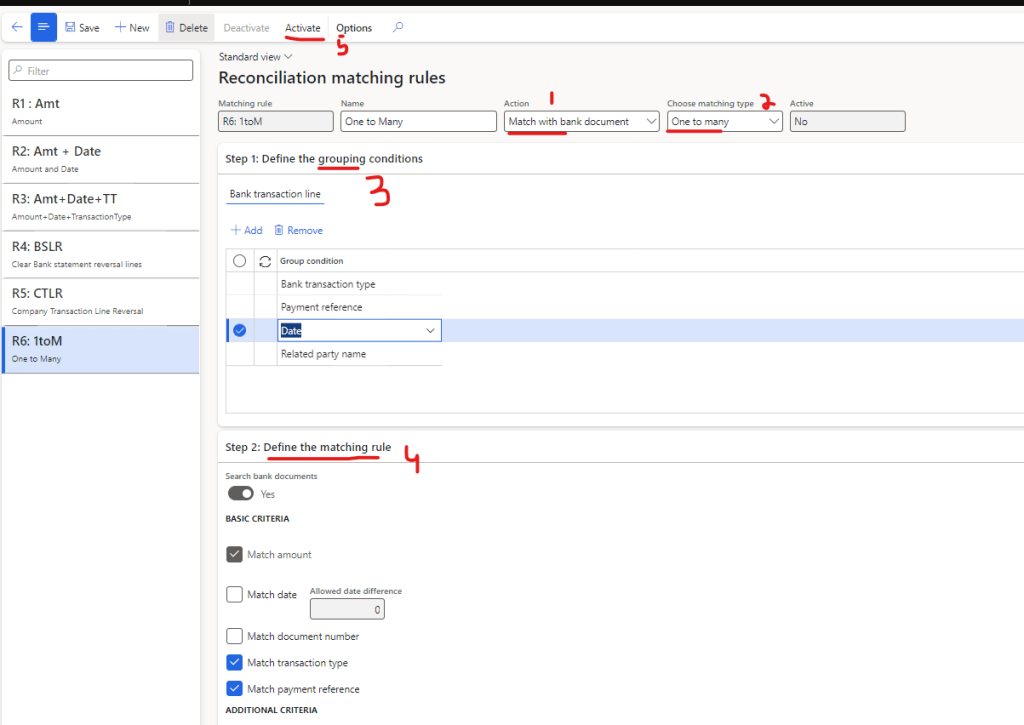
For that we can make a matching rule
- Action should be “Match with bank document”
- Matching type needs to be “One to Many”
- In Grouping conditions we can select the parameter on which we needs to group the transactions of D365. In my scenario all such transaction which have same Date, transaction type, payment reference and Related party name should be grouped together
- In Matching rule we will define that how our grouped transaction is going to be matched with bank statement line.
- Activate the rule
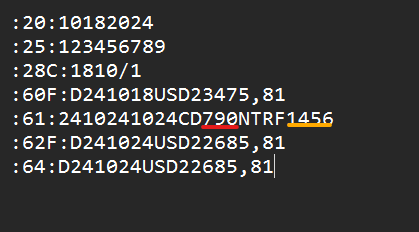
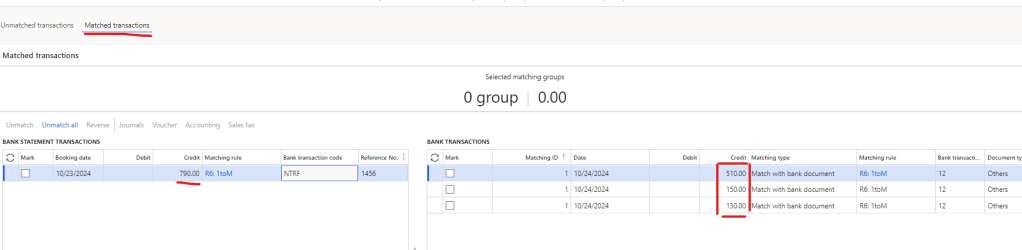
I’ve a MT940 file which show only one transaction of 790 USD and it have a reference number 1456
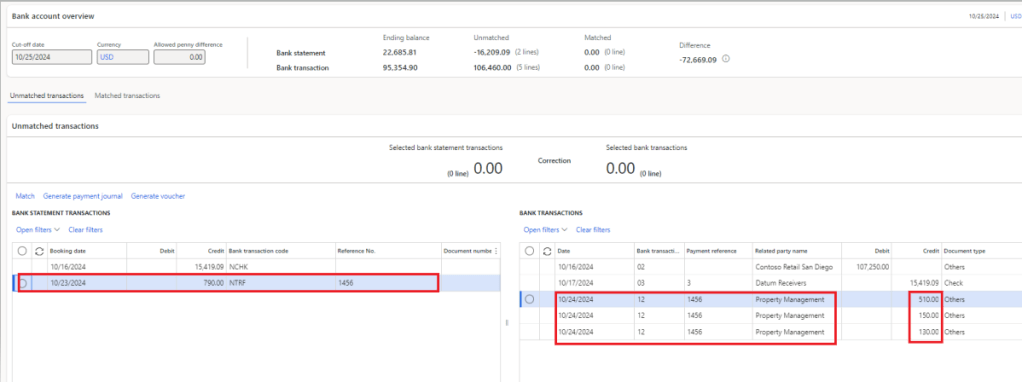
Let’s import it and go to reconciliation worksheet
In the right grid, I have three transactions that meet the grouping criteria. Additionally, the payment reference, bank transaction code (type), and amount align with the matching rule, so this single line from the bank statement should reconcile with the three D365 bank transaction lines.
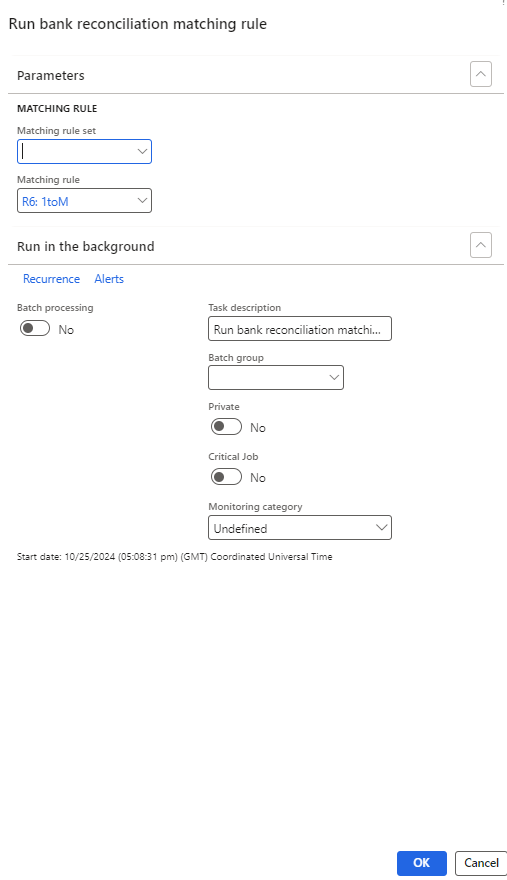
Run 1 to many matching rule (remember we can also add this matching rule in matching rule set)
So, these lines got reconciled.
Many to One:
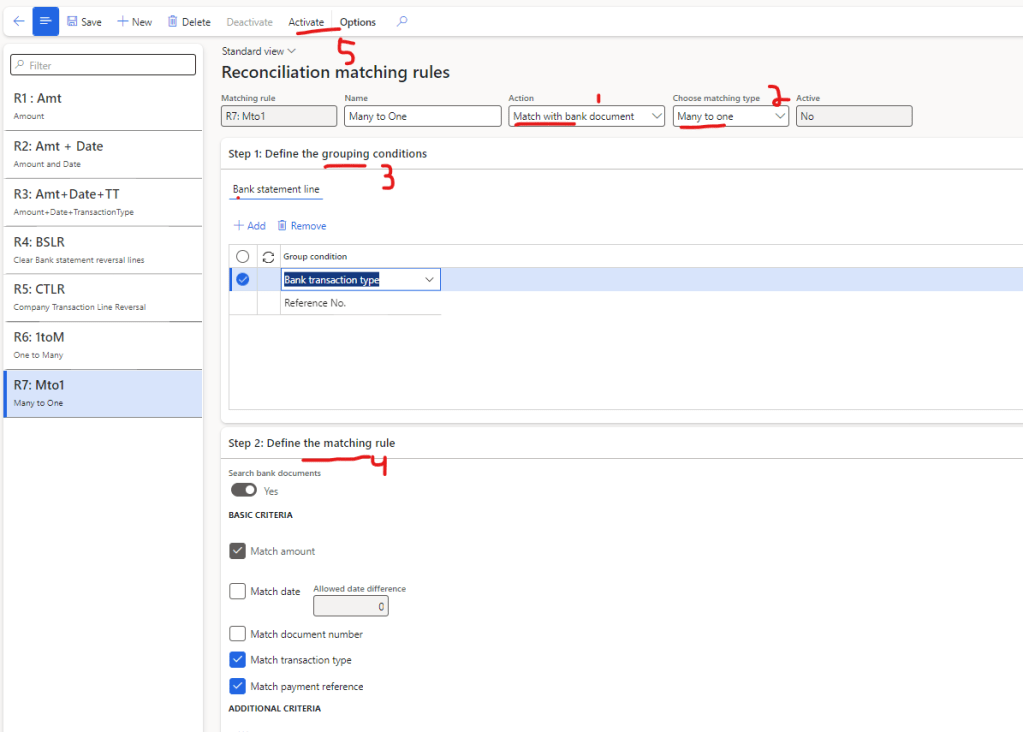
In a many-to-one scenario, multiple transactions in the bank statement may correspond to a single transaction in D365 bank transactions. For this type of scenario, we can configure the matching rule as follows:
- Action should be “Match with bank document”
- Matching type needs to be “Many to One”
- In Grouping conditions we can select the parameter on which we needs to group the Bank statement lines. In my scenario all such transaction which have same Bank transaction type and reference number should be grouped together
- In Matching rule we will define that how our grouped transaction is going to be matched with D365 bank transactions.
- Activate the rule
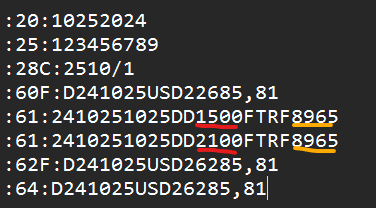
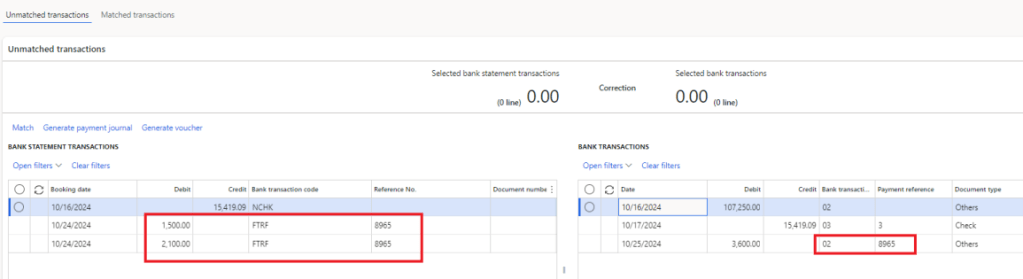
I’ve a MT940 file which show two transactions of 1,500 USD and 2,100 USD and it have a reference number 8965
Let’s import it and go to reconciliation worksheet
In the left grid, I have two bank statement lines that meet the grouping criteria. Additionally, the payment reference, bank transaction code (type), and amount align with the matching rule, so these two bank statement lines should reconcile with a single line in the D365 bank transactions.
Run Many to One matching rule (remember we can also add this matching rule in matching rule set)
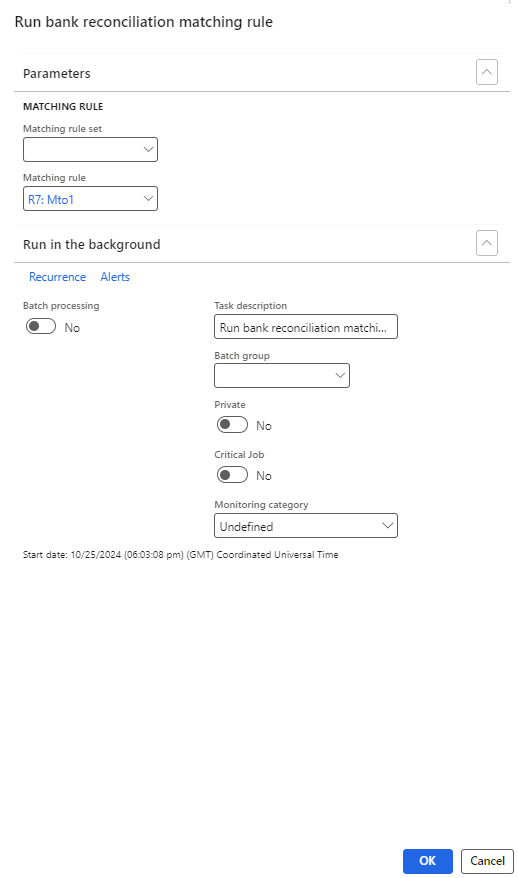
So, these lines got reconciled.

Many to Many
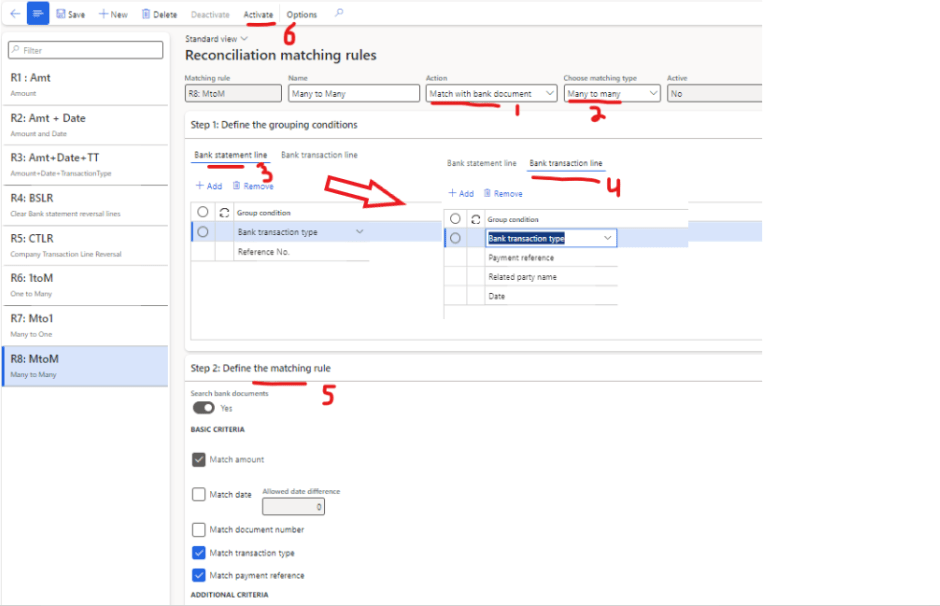
In a many-to-many scenario, we aim to match multiple bank statement lines with multiple D365 bank transactions. For this type of scenario, we can configure the matching rule as follows:
- Action should be “Match with bank document”
- Matching type needs to be “Many to Many”
- In Bank statement line we can select the parameter on which we needs to group the Bank statement lines. In my scenario all such transaction which have same Bank transaction type and reference number should be grouped together.
- In Bank transaction line we can select the parameter on which we needs to group the transactions of D365. In my scenario all such transaction which have same Date, transaction type, payment reference and Related party name should be grouped together.
- In Matching rule we will define that how our grouped transaction is going to be matched.
- Activate the rule.
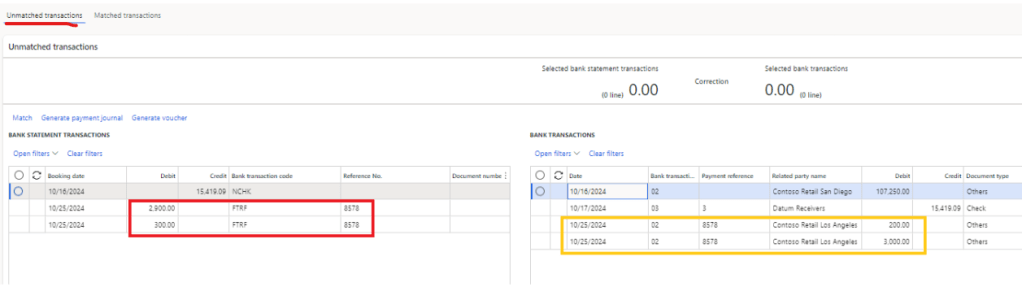
I’ve a MT940 file which show two transactions of 2,900 USD and 300 USD and it have a reference number 8578.
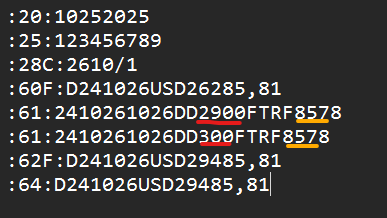
Let’s import it and go to reconciliation worksheet
In each grid, I have two transaction lines that meet the grouping criteria, though the individual line amounts don’t match. However, the payment reference, bank transaction code (type), and total amount align with the matching rule. Therefore, these two bank statement lines should be reconciled with the two D365 bank transaction lines.
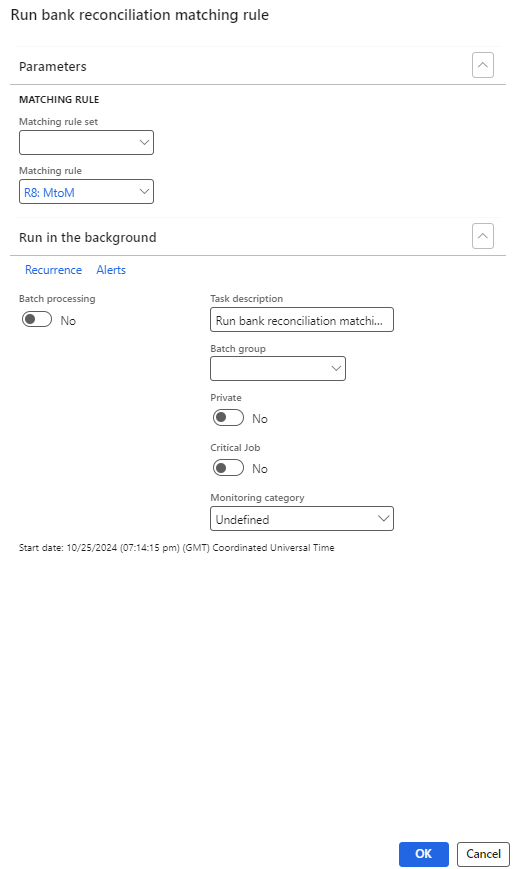
Run Many to Many matching rule (remember we can also add this matching rule in matching rule set)
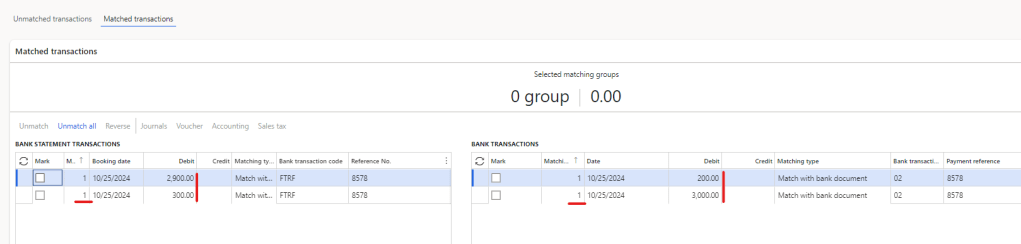
So, these lines got reconciled.
That wraps up our overview of matching types—hope you learned something new!
Thank you, and may your Halloween be filled with treats and not tricks as you tackle your reconciliations!” 🎃
 IntelliDax
Leave a comment